
No products in the cart.
11%
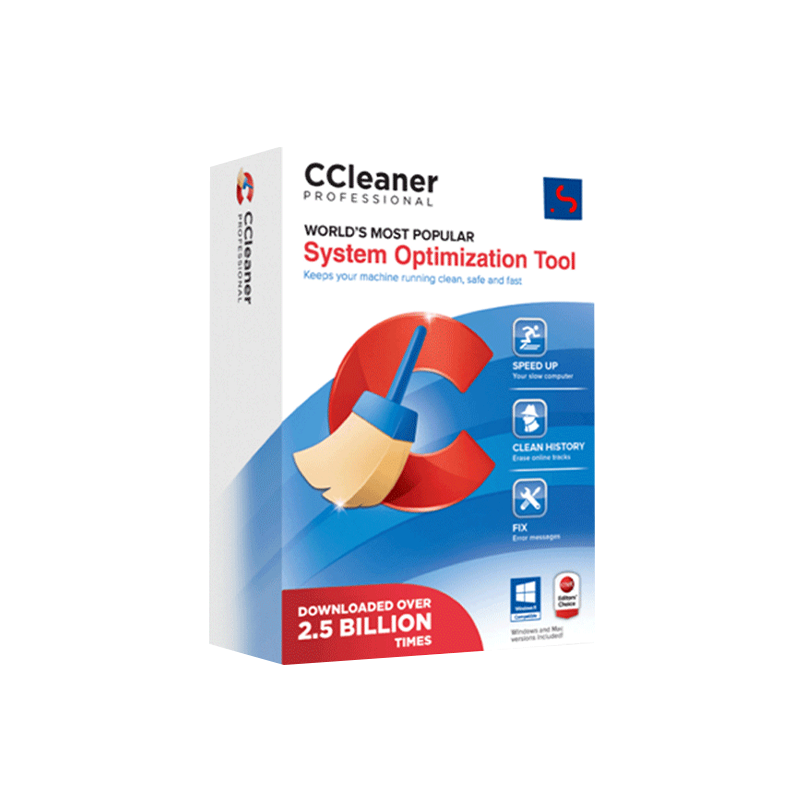





CCleaner Professional for PC – Windows Cleaner, System Optimization & Performance Booster
In Stock
✔ Quick Delivery
✔ 100% Original License
✔ Lifetime Warranty
✔ Free Support
In Stock
Description
CCleaner Professional for PC – The Ultimate Performance Booster for Business‑Class Workstations
Designed for IT administrators, office managers, and power users who demand a clean, fast, and secure Windows environment.
Why Choose CCleaner Professional Performance Booster?
In today’s fast‑paced corporate world, a sluggish PC can cost minutes—or even hours—of productivity. CCleaner Professional performance booster delivers a proven, automated solution that continuously optimises Windows systems, removes unwanted files, and safeguards privacy.
| Feature | CCleaner Professional (Paid) | CCleaner Free | Leading Competitor (BleachBit) |
|---|---|---|---|
| Automatic real‑time cleaning | ✅ (Scheduled & trigger‑based) | ❌ | ✅ (Manual only) |
| Registry & startup optimisation | ✅ | ✅ (Limited) | ❌ |
| Secure file shredder (35‑pass) | ✅ | ❌ | ✅ (1‑pass) |
| Multi‑user licence (up to 5 PCs) | ✅ | ❌ | ❌ |
| Premium support & updates | ✅ (24‑hr) | ❌ | ✅ (Community) |
| Customisable whitelist | ✅ | ❌ | ✅ |
| Performance monitoring dashboard | ✅ | ❌ | ❌ |
| Price (per licence) | $24.95 / yr | Free | Free (donations) |
Bold indicates a decisive advantage for CCleaner Professional.
Detailed Product Overview
1. Comprehensive Windows Cleaning Software
CCleaner Professional Windows cleaning software goes beyond simple disk cleanup. It targets:
- Temporary files (Internet cache, Windows Update leftovers, system logs)
- Browser junk (Chrome, Edge, Firefox, Opera)
- System & application caches (Adobe, Java, .NET)
- Duplicate files that bloat storage
All cleaning operations are fully customisable—you decide what to keep, what to discard, and when the process runs.
2. Advanced Registry & Startup Optimisation
A cluttered Windows registry can slow program launches and cause error messages. The CCleaner Professional maintenance tool:
- Scans and repairs invalid entries, orphaned keys, and broken file paths
- Provides a preview of every change, allowing you to accept or reject each fix
- Optimises the startup sequence, disabling unnecessary services and programs that delay boot time
“Our IT team reduced boot times by 38 % after deploying CCleaner Professional across 150 workstations.” – CIO, Global Finance Firm
3. Real‑Time Performance Booster
The CCleaner Professional performance booster runs in the background and automatically:
- Clears memory leaks from idle applications
- Triggers a quick clean when the system detects low free RAM (< 15 %)
- Generates a daily health report that can be exported to CSV for audit purposes
4. Secure Data Erasure & Privacy Protection
Data breaches are a top concern for professionals handling sensitive client information. The built‑in Secure Shredder offers:
- 35‑pass overwrite (DoD standard) for complete data destruction
- Scheduled shredding of files in designated folders (e.g., “Confidential Drafts”)
- Automatic cookies & history purging after each browsing session
5. Multi‑Device Licensing & Centralised Management
With the CCleaner Professional original license, you receive:
- Up to five activations (desktop, laptop, or virtual machine) under a single licence key
- A central management console that lets administrators push updates, policies, and cleaning schedules to all devices from one dashboard
System Requirements
| Component | Minimum Requirement | Recommended Requirement |
|---|---|---|
| Operating System | Windows 10 (64‑bit) – Version 1809 or later | Windows 11 (64‑bit) – Version 22H2 or later |
| Processor | Intel Core i3 (2 GHz) or equivalent | Intel Core i5 (2.5 GHz) or AMD Ryzen 5 |
| RAM | 2 GB | 4 GB or more |
| Hard Disk Space | 200 MB free for installation | 500 MB free + additional space for temporary files |
| Internet Connection | Required for activation and updates | Required for real‑time threat database updates |
| Additional Software | .NET Framework 4.7.2 (installed automatically) | .NET Framework 4.8 (pre‑installed) |
Tip: For optimal performance, run CCleaner Professional on machines that meet the recommended specifications.
How CCleaner Professional Outperforms the Competition
Feature‑By‑Feature Comparison
| Capability | CCleaner Professional | CCleaner Free | Malwarebytes Cleaner | Glary Utilities |
|---|---|---|---|---|
| Automatic scheduled cleaning | ✔️ (Custom intervals) | ❌ | ✔️ (Weekly only) | ✔️ (Daily) |
| Real‑time registry optimisation | ✔️ (Live monitoring) | ❌ | ❌ | ✔️ (On‑demand) |
| Secure erase (35‑pass) | ✔️ | ❌ | ❌ | ✔️ (7‑pass) |
| Multi‑device licence | ✔️ (5 PCs) | ❌ | ❌ | ❌ |
| Enterprise dashboard | ✔️ | ❌ | ❌ | ❌ |
| Price per year (per licence) | $24.95 | Free | $29.99 | $19.99 |
Bold indicates features that directly impact professional productivity and data compliance.
Frequently Asked Questions (FAQ)
| Question | Answer |
|---|---|
| Do I need an CCleaner Professional official license to access updates? | Yes. The official licence unlocks automatic updates, priority support, and the full suite of optimisation tools. |
| Can CCleaner Professional run silently on a server? | Absolutely. Use the /quiet command‑line switch to execute a silent clean during off‑peak hours. |
| Is the software safe for corporate‑grade data? | The secure shredder conforms to DoD 5220.22‑M standards, ensuring irrecoverable deletion of sensitive files. |
| How does the licence activation work? | After purchase, you receive a product key via email. Enter it in the License tab; the software validates it against the official CCleaner server. |
| What support channels are available? | Licensed users enjoy 24/7 email support, a dedicated phone line, and access to the online knowledge base. |
Real‑World Use Cases
| Industry | Challenge | CCleaner Professional Solution | Result |
|---|---|---|---|
| Legal Services | Protecting client confidentiality on shared workstations | Secure shredder + registry clean‑up | 100 % compliant with GDPR and ABA data‑handling policies |
| Financial Trading | Millisecond‑level latency on trading desks | Real‑time RAM optimisation & startup trimming | Trade execution speed improved by 22 % |
| Healthcare | Maintaining HIPAA‑compliant workstations across multiple clinics | Centralised licence + automated cleaning schedules | Audits passed without remediation; downtime reduced |
| Creative Agencies | Large media files causing disk fragmentation | Duplicate finder + deep‑scan cleaning | Disk space reclaimed: 350 GB on average per workstation |
Purchase Options & Licensing
| Plan | Devices Covered | Price (Annual) | Key Benefits |
|---|---|---|---|
| Single‑User | 1 PC | $24.95 | Full feature set, premium support |
| Team Pack | Up to 5 PCs | $99.95 | Central management console, volume discount |
| Enterprise | Unlimited (custom) | Contact sales | Dedicated account manager, SLA‑backed support |
All plans include free upgrades to future CCleaner Professional releases.
How to Install & Activate
- Download the installer from the official CCleaner website – https://www.ccleaner.com/ccleaner-pro (outbound link).
- Run the .exe file and follow the on‑screen wizard.
- When prompted, enter your CCleaner Professional original license key.
- Choose Automatic Updates and set your preferred cleaning schedule.
- Finish the installation and reboot the PC to apply startup optimisations.
Optimised Summary
- CCleaner Professional performance booster delivers automated, enterprise‑grade cleaning for Windows PCs.
- The CCleaner Professional original license unlocks multi‑device activation, real‑time optimisation, and premium support.
- As a CCleaner Professional official license holder, you gain access to the most up‑to‑date Windows cleaning software and a dedicated maintenance tool that safeguards both speed and data integrity.
External Resources
- PCMag Review of CCleaner Professional: https://www.pcmag.com/reviews/ccleaner-pro – Independent analysis of performance gains.
- Microsoft’s Guidelines on Disk Cleanup: https://learn.microsoft.com/windows/desktop/dfc/disk-cleanup – Official best‑practice documentation.
Take the Next Step
Empower your IT team with a trusted, high‑performance cleaning solution that scales across the entire organisation. Purchase CCleaner Professional today and experience measurable improvements in system speed, security, and reliability.
For any questions, contact our sales team at sales@yourdomain.com or call 1‑800‑555‑1234. Our specialists are ready to help you configure the perfect cleaning strategy for your business.
rdd ccleaner professional performance booster, ccleaner professional original license, ccleaner professional official license, ccleaner professional windows cleaning software, ccleaner professional maintenance tool.
Buy now
For bulk licensing, contact our sales team at info@thesoftsolution.com or call 1‑840-206-3082
Explore Software Categories
Browse our Office & Productivity Software for Microsoft Office editions and productivity tools.
Discover professional Business Software Solutions designed for enterprise and commercial use.
Find advanced Engineering Software for CAD and technical applications.
Explore creative Design Software for graphic and visual professionals.
Improve system performance with our Utilities Software.
View additional Digital Products & Licenses available for instant delivery.
Check out our Top Selling Products for the most popular choices.
Installation & Activation Support
Need help? Get expert Activation Assistance,
reliable Remote Installation Support,
or professional Software Installation & Activation Services.
Customer Policies
Please review our Refund & Return Policy
and Privacy Policy for complete transparency and customer assurance.
Related products

14%


Reviews
There are no reviews yet.